Troubleshooting social channels
Social channels not visible in PeopleStage Library
From Q2 2019 onwards, new FastStats systems no longer use a separate Facebook or Twitter database. Instead, a single Social database includes LinkedIn too.
If you have updated an existing system using the FastStats Configurator, you may find that Social Channels aren't visible in the PeopleStage Library. This needs a manual step.
Note
Only a user with Admin permissions can perform this process.
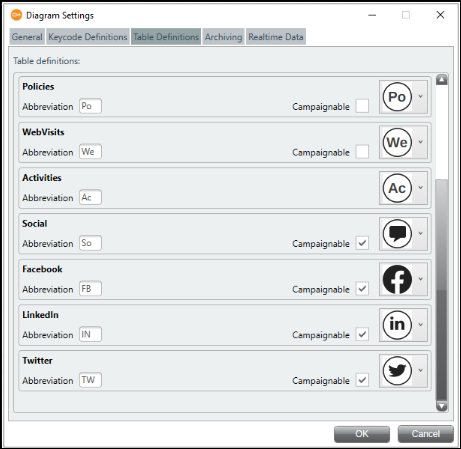
- Open PeopleStage and select File > Administration > Diagram Settings Editor.
- Select the Keycode Definitions tab.
- Delete any blank definition if present.
-
Select the Table Definitions tab, then select the Campaignable check-box for Social Channels.