ASP.NET Core 10
From Orbit 2.5.4, due for release on 12 November 2026, the OrbitAPI requires the ASP.NET Core 10 Hosting Bundle instead of .NET 8. Microsoft ends support for .NET 8 on 10 November 2026.
Install ASP.NET Core 10 on your web server before 12 November 2026. Without it, Orbit stops updating automatically and you won't receive new features or fixes.
Timeline of changes
| Date | Change |
|---|---|
| November 2025 | Microsoft .NET 10.0 released |
| 10 November 2026 | End of support for ASP.NET Core 8 |
| 12 November 2026 | Orbit 2.5.4 due for release, requiring the ASP.NET Core 10 Hosting Bundle |
What you need to do
For existing Apteco Orbit installations
Warning
Keep ASP.NET Core 8 installed while you install version 10. Removing it first can stop the OrbitAPI working correctly. You can uninstall it once you've updated to Orbit 2.5.4 or later.
To install ASP.NET Core 10 on your web server:
-
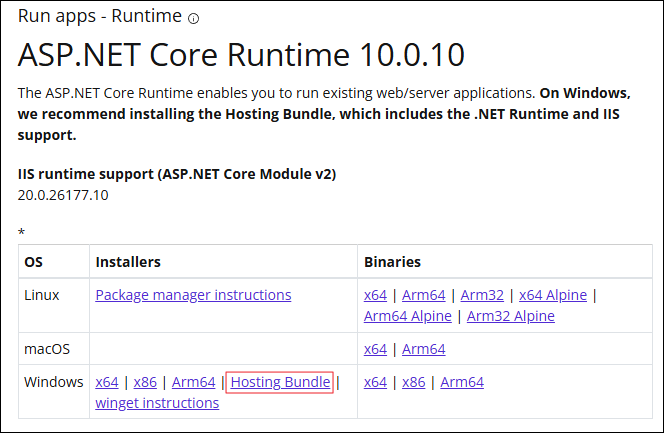
Install the ASP.NET Core 10 Hosting Bundle from dotnet.microsoft.com/en-us/download/dotnet/10.0.
-
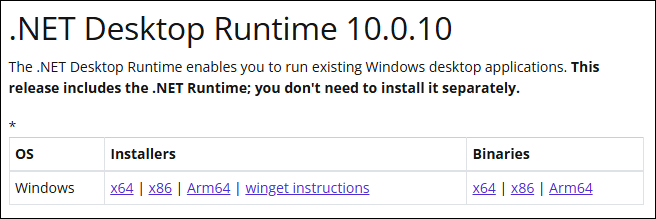
Install the .NET Desktop Runtime from the same page.
You don't need to do anything else. The updater detects ASP.NET Core 10 the next time it attempts an update, and then updates to the latest version.
For the latest updates and details from Microsoft, visit the Microsoft .NET 10 downloads page.
For new Apteco Orbit installations
Until Orbit 2.5.4 is released, Orbit still requires .NET 8. To set up a new installation:
- Install the .NET 8 components listed in the installation prerequisites.
- Install the ASP.NET Core 10 Hosting Bundle and the .NET Desktop Runtime, so your system is ready for Orbit 2.5.4.
From Orbit 2.5.4, you only need the .NET 10 components.
Getting help
If you have any issues, contact the technical services team.
Frequently asked questions
About Microsoft ASP.NET Core
Microsoft ASP.NET Core is a framework that runs on Microsoft .NET. It provides basic services for internet-connected apps, such as web apps, IoT (Internet of Things) apps, and mobile backends.
The Orbit API uses the Microsoft ASP.NET Core framework.
Why this update is necessary
Orbit has used .NET 8 since version 2.1.3 in 2024, as its Long-Term Support (LTS) version of .NET. Microsoft is ending support for it and it will no longer receive security updates, representing a security risk.
Microsoft released the current LTS release, .NET 10 (including the ASP.NET Core libraries), in November 2025, and Orbit is now migrating to this version.
Whether this will happen again
Apteco anticipates needing to move to a newer version of .NET in the future. Microsoft has committed to supporting .NET 10 until at least November 2028. See https://dotnet.microsoft.com/en-us/platform/support/policy/dotnet-core for further information.
What happens if ASP.NET Core 10 isn't installed
From Orbit 2.5.4, systems without ASP.NET Core 10 can still continue using Orbit.
They won't automatically update until you install the prerequisite, and won't benefit from any new Orbit features or fixes. Earlier Orbit versions still run on .NET 8 after 10 November 2026, but Microsoft no longer releases security patches for it.
Prerequisites for installing ASP.NET Core 10
The web server must run an operating system that Microsoft supports. The .NET 10 supported OS list shows which operating systems Microsoft supports.
If the web server's operating system isn't listed
If the web server's operating system isn't on the supported list, you won't be able to install Microsoft .NET Core. See What happens if ASP.NET Core 10 isn't installed for how this affects your system.
Effect on other applications that use .NET Core
There's no effect. You can install ASP.NET Core 10 side by side with other versions of the same component library.
Issues when uninstalling earlier versions of ASP.NET Core
Uninstalling an earlier version of the ASP.NET Core Hosting Bundle (e.g. 8) before installing version 10 can de-register it within IIS. This means the OrbitAPI will no longer run correctly.
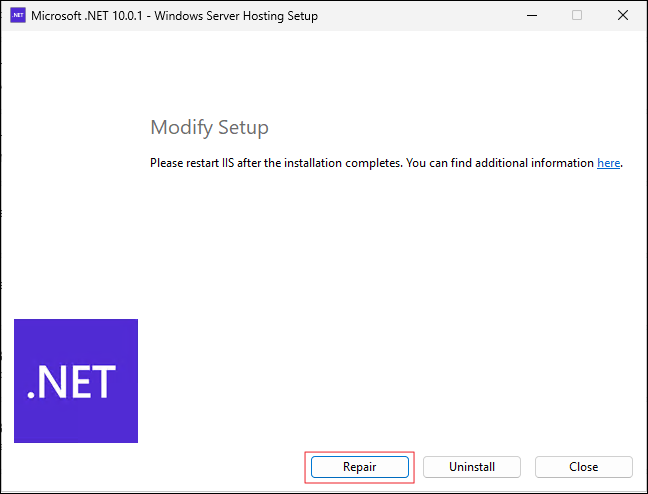
To avoid this, repair the ASP.NET Core installation from within Apps & Features:
-
Select the Windows Server Hosting entry, and then the Modify option.

-
In the dialogue that opens, select the Repair option.
-
Restart IIS.