String functions
These functions allow string manipulation.
FormatNumber
Formats a number to the given precision.
Formats n, where ndp is the number of decimal places and 'use separator' denotes whether to display thousand separators with "T" or "F" as valid values.
For example, if [Cost] is 56.78:
AddStr("your bill is £",FormatNumber([Cost],2))is "Your bill is £56.78"AddStr(“Your rounded bill is £”,FormatNumber(Round([Cost]),0)is “Your rounded bill is £56”
Tip
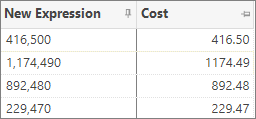
Use FormatNumber([Cost]*1000,0,"T") to calculate and insert thousand separators:
Left
Left part of a string.
For example, Left(“Red Nose Day”,6) = “Red No”
Right
Right part of a string.
For example, Right(“Red Nose Day”,3) = “Day”
Mid
Middle part of a string.
Extracts n characters from the string. The start position is 1-based.
For example, Mid(“Red Nose Day”,5,4) = “Nose”
SubStr
Returns a portion of a string.
Start is a zero based offset.
If variable Surname = "Pants" in current record:
SubStr([Surname],1,3)returns "ant"SubStr([Surname],0,3)returns "Pan"
AddStr
Concatenates strings together.
For example, AddStr([Title],” “,[Initial],” “,[Surname]) might return “Mr J Smith”.
StrCompare
Compares two strings.
Case_sensitive is an optional numeric parameter. If case_sensitive evaluates to 1 then the comparison is case sensitive. If case_sensitive evaluates to 0 or missing_value or is not provided then the comparison is not case sensitive.
For example, StrCompare( string1, string2) compares two strings alphabetically and returns:
- 1 if
[string1]>[string2] - -1 if
[string1]<[string2] - 0 if
[string1]=[string2]
StrLength
Gets length of a string.
For example, StrLength ("Apteco") = 6
StrLower
Converts a string to lower case.
For example, StrLower("Apteco") = "apteco"
StrUpper
Converts a string to upper case.
For example, StrUpper("Apteco") = "APTECO"
StrProper
Converts a string to proper case.
StrProper case capitalises the first letter after a space or punctuation character.
For example, StrProper (“redfern house”) = “Redfern House”
StrReverse
Reverses a string.
For example, StrReverse("Apteco") = "ocetpA"
StrContains
Finds substrings within a string.
StrContains searches string x for substrings a, b, c, etc., and returns the index of the first match found, or zero if none are found.
Examples:
StrContains(“Huddersfield Town”,”City”,”Town”)= 2StrContains(“Smith”,”Smith”,”Jones”,”Walker”)= 1StrContains(“Huddersfield Town”,”udders”,”cow”,”field”)= 1StrContains(“Huddersfield Town”,”Udders”,”Cow”,”Field”)= 0StrContains(“[email]”,”hotmail”,”yahoo”,”aol”,”ntlworld”)detects if the email field has any of the listed ISPs.
Note
StrContains is case sensitive. Use StrUpper or StrLower to equalise the case if case insensitive match is required.
For example, StrContains(StrUpper(“Huddersfield Town”),”UDDERS”,”COW”,”FIELD”) = 1
StrFind
Locates a substring within a string.
Returns the zero based start offset of the substring or -1 if not found.
Examples:
StrFind (“Huddersfield Town”,”Town”)= 13StrFind (“Huddersfield Town”,”Hudd”)= 0StrFind (“Huddersfield Town”,”Udders”)= -1
Note
Note StrFind is case sensitive. Use StrUpper or StrLower to equalise the case if case insensitive match is required.
LeftTrim
Removes leading spaces from string.
For example, LeftTrim(" Apteco ") = "Apteco "
Trim
Removes all spaces except for leaving a single space between words.
For example, Trim(" James Alty Apteco") = "James Alty Apteco"
StrClean
Removes all characters from string 1 that are listed in string 2 (case sensitive).
For example, StrClean("Apteco","e") = "Aptoc". StrClean([Postcode]," ") = "CV344AP"
StrReplace
Replaces all occurrences of A with B in string X (case sensitive).
For example, StrReplace("Apteco","A","a") = "apteco"
StrNumber
Converts a string value to its numeric (double) representation. If the input text does not represent a number, StrNumber exaluates to a missing value.
For example, StrNumber("123") = 123
StrShred
Converts a text entry into a delimited, alphabetical list of the constituent words.
The expression format is as follows:
The min and max size will determine the number of letters in the words that are returned.
For example, StrShed([Address],4,20,"Proper",",").
.png)
StrShredContains
Converts a text entry into a delimited list, as per StrShred expression, and determine which words to search for. This will return a 1 for a match on the first word searched for, 2 on the second etc. and a 0 if nothing matches.
The expression format is as follows:
Where String1, String2 etc. are the words you are searching for.
For example, StrShredContains([Address],4,20,"Proper","Close","Road")
.png)
Telephone
Converts a text entry into a number which is compatible with TPS 1.2 "Without Spaces" format.
See TPS technical documentation.
This UK specific option will also remove any 44 prefix from the number.
The expression format is as follows:
Where text = a text variable and options = TPS, which is the only option at present.
For example, Telephone([Telephone],"TPS")
.png)
StrStreak
Allows you to return the first characters of a string until there is a change in characters.
For example:
StrStreak(“abbccdde”)will return aStrStreak(“bbbaccdd”)will return bbb
StrHash
Allows you to take a string and apply one of a number of algorithms that will encrypt the string so that it is secure when passed over a network.
For example, StrHash([Email Address],”SHA256”)
StrCount
Counts the number of times a target string appears in a search string. This action is case sensitive and works only for the non-overlapping occurrences.
For example, StrCount("banana","an") will return a value of 2
FromAscii
Provides the string representation of the Ascii code specified.
For example, FromAscii(65) will return the string A
ToAscii
Provides the code of the Ascii value specified.
For example, ToAscii("A") will return the code 65
Note
If the string value used is longer than 1 character, this function will return "Missing Value".
Combining string functions
Combining string functions with missing values functions and logical functions can create powerful expressions.
The following example creates a salutation, like Dear Mr J Smith.
If the surname is missing for the record, the salutation would be Dear Customer.