FastStats release notes 2026
Q3 2026
28 September, 2026
Analysis
Additional numeric pattern match return values
When creating numeric pattern match aggregations manually, or via the Sequence Analysis wizard, you can now return the minimum or maximum numeric value from your defined transactional pattern.
For example, when reviewing current giving, a charity could identify an individual's maximum donation to determine an appropriate request, such as an N% increase for any subsequent donations.
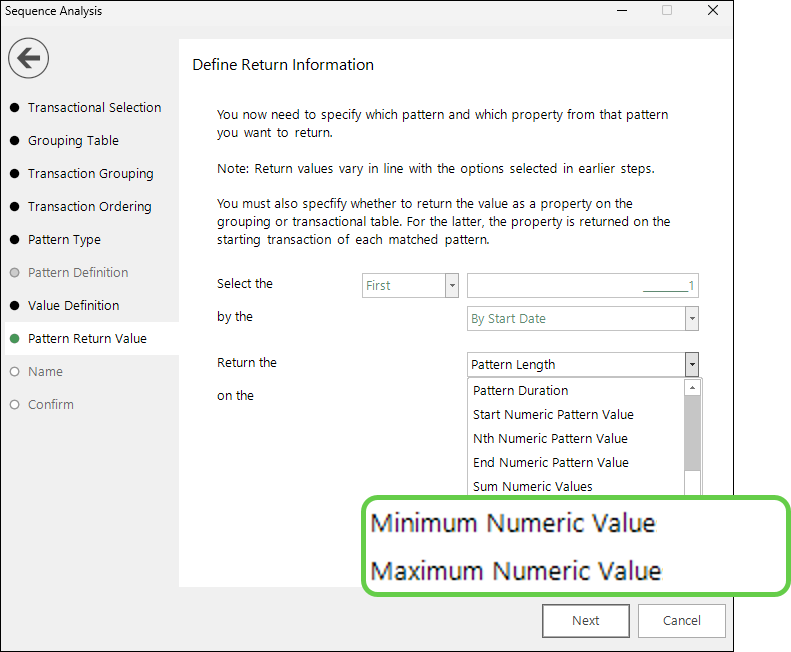
See Pattern return value.
Alternative method for adding variable categories as query statistics on a cube
You can now quickly add selection measures to a cube based on the categories in a single selector variable, using a new right-drag option. This gives you more flexibility, saves time, and removes the need to generate multiple separate selections for this type of analysis.
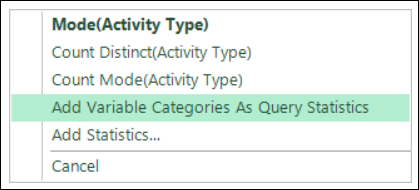
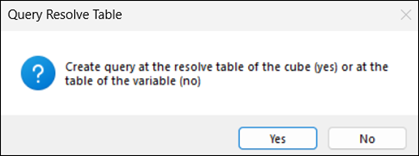
You can choose to add the query statistics at the cube's resolve table level or at the variable's own table level:
This can help you examine, for example, marketing channel activity, activity across different products or departments, or the significance of available payment channels.
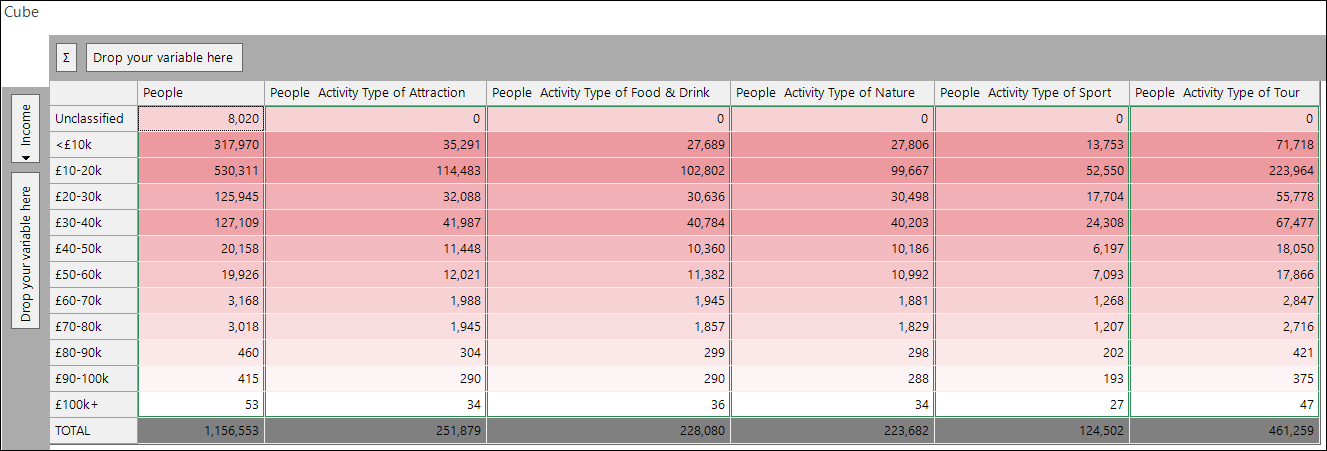
See Queries added as statistics.
Wider default date range for date expressions
Date and datetime expressions now default to a start year of 2000, rather than five years before the current year, so fewer dates fall outside the range. If a date does fall outside the range, FastStats now warns you when you set up the expression.
See Banded date or datetime expressions.
For administrators
Query optimisation defaults to level 5
The Apteco engine's query optimisation setting now defaults to level 5.
This change takes effect automatically with no configuration required. If level 5 optimisation is not suitable for your environment, you can override this setting manually in the FastStats Configurator.
Extended support for optimised queries
The Apteco engine's query optimisations now cover more scenarios, including bitmapped and primary selector variables across both single-table and multi-table queries.
Designer deployment requires a matching Web Service version
From Q3 2026, Designer can only deploy to a Web Service running the same version. We recommend upgrading all your Apteco software together. See full details.
Bug fixes
- Reinstated the ability to change the resolve table level for event-driven behavioural models.
Q2 2026
5 June, 2026
Analysis
Saved files in selections
In FastStats, left‑dragging a saved .XML selection file into another selection copies the selection logic into the new query. After this point, any changes made to the original query logic don't affect the new selection.
This differs from left‑dragging a .URN file, which uses a Unique Reference Number (URN). This creates a reference to the original file within the new selection. As a result, any changes made to the original URN file automatically apply to all queries that reference it.
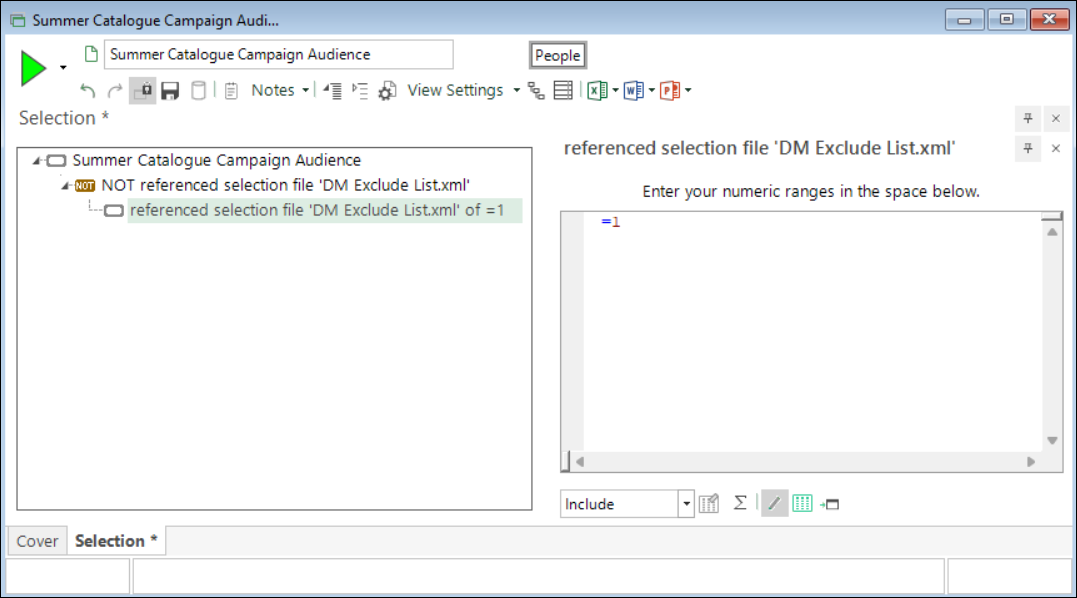
New functionality now lets you add a saved .XML file by reference using the right‑drag context menu. With this approach, the new selection reflects changes to the source selection, and so do any other selections that reference the same XML file.
You can use saved .XML selections by reference throughout your analysis, including in:
- Cube dimensions and measures
- Data grid columns
- Expression filters
- Virtual variable selections
They're particularly useful for aggregations with transactional filters, or for exclusion groups shared across multiple analyses or campaigns, that need regular updating.
Note
The user is responsible for ensuring that the referenced file isn't accidentally modified or deleted.
See Using a saved file in a selection
Pattern match time markers
Pattern‑matching transactional analysis now includes time markers. Time markers let you look for defined behaviours occurring at any point in a person's transactional history, within a defined window.
Example use cases include:
- Searching for a specific sequence of results in a particular set of time periods
- Identifying people who have one transaction per quarter for five successive quarters
- Analysing donors who made a one-off donation and later transitioned to a regular giving pattern
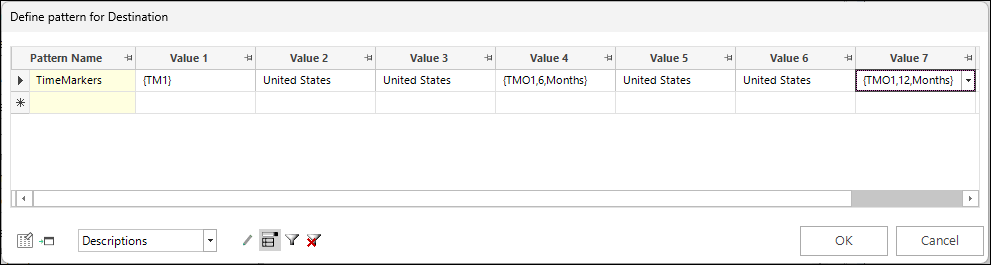
For example, to match the pattern shown earlier, a person must have exactly two United States holidays within a six-month period. They then need two more holidays in the next six-month period. You can use a data grid to validate the results.
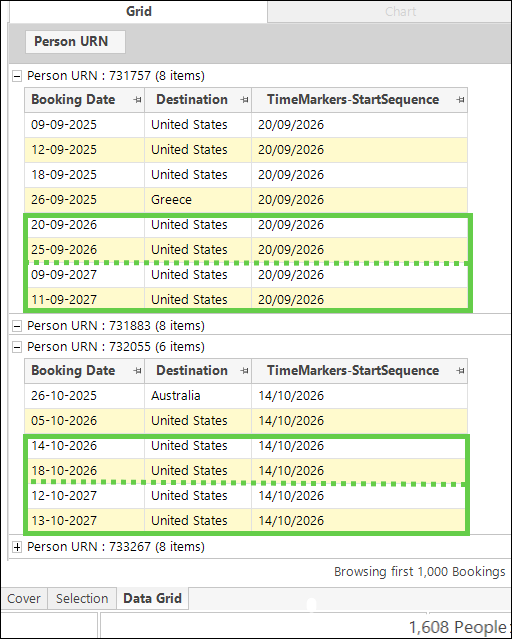
See Expressions: Aggregations on the fly - Pattern Match time markers.
Best fit all columns for data grids
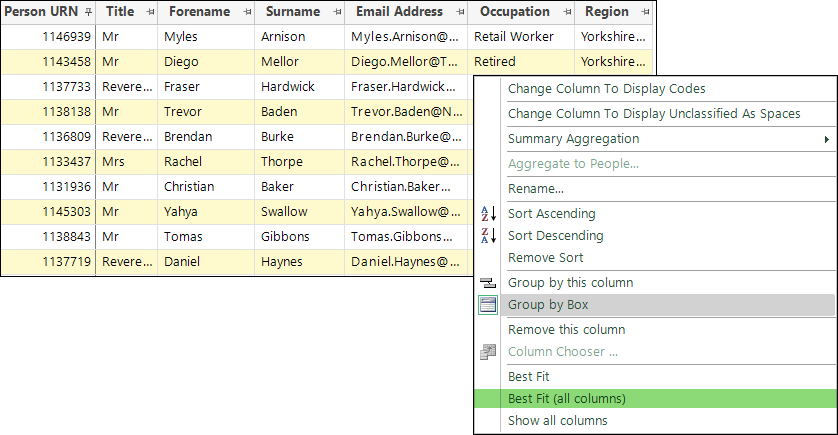
Data grid column headers now include a new right-click context menu option. This option automatically resizes all columns so they best fit the data they contain.
VarCode() expression function for selector variables
Returns the code for a selector variable category.
You can identify the category by:
- Description: To return the code for the category with the given description.
- Index number: To return the code at the specified index position.
Example:
This returns the code for the Product Code category with the description "Flight Only".
When used with a flag array variable, the final parameter can also be a numeric set. In this case, the function returns a delimited list of codes corresponding to the indexes in the set.
CodeOf() second parameter option
Previously the CodeOf() expression accepted only one parameter and its output differed depending on the variable type:
- Flag arrays returned a text string of 0s and 1s indicating which flags were on.
- Arrays returned a delimited list of selected values.
You can now add an optional second parameter to make the output for flag arrays match the array format.
Example:
For the chosen records, this returns a delimited list of all the codes selected.
Behavioural modelling
This section outlines the latest behavioural modelling developments.
Extended modelling selection scenarios
Behavioural modelling identifies groups of people who have historically exhibited a specific behaviour - for example, responding to a campaign. You can then analyse how a group's earlier behaviour differs from others. The aim is to predict which additional people within your database are likely to behave similarly.
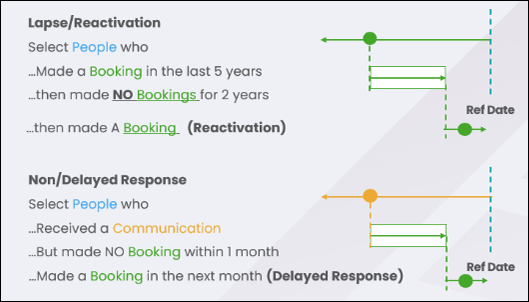
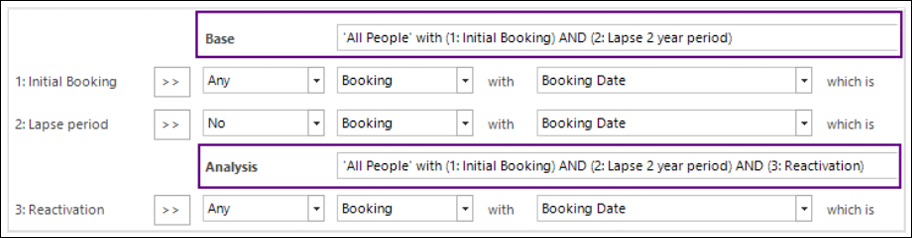
Previously, the behaviour you modelled had to involve an active event, such as a response. You can now also model inactive events - the absence of an action - and optionally follow this with any number of subsequent events.
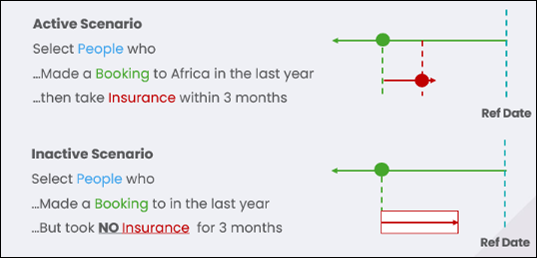
This enables new modelling scenarios, including:
- Lapsing
- Reactivation
- Non-responses
- Delayed responses
FastStats can then identify people who are likely to exhibit these behaviours.
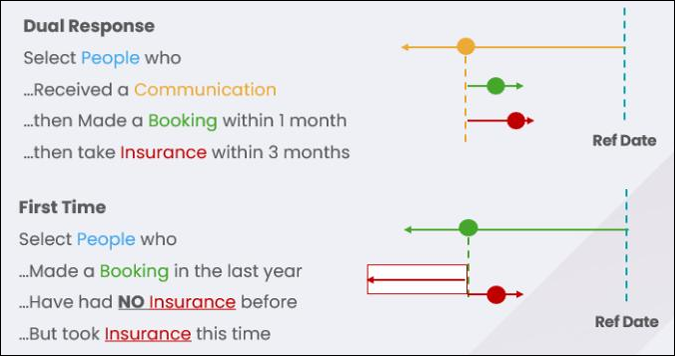
Event sequences are no longer limited to a single linear chain. You can now:
- Let multiple events follow the same event
- Define events as occurring before another event
This facilitates modelling of multiple or first-time response scenarios.
For details on set-up, implementation and limitations, see Behavioural modelling - scenarios.
Custom naming of events
You can now customise the names and descriptions of events used in event-driven selections.
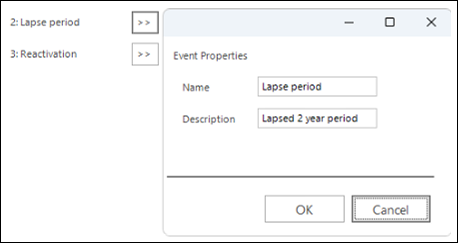
The default names applied to the analysis and base groups will automatically detect and apply these customised event names.
Autogenerated selections
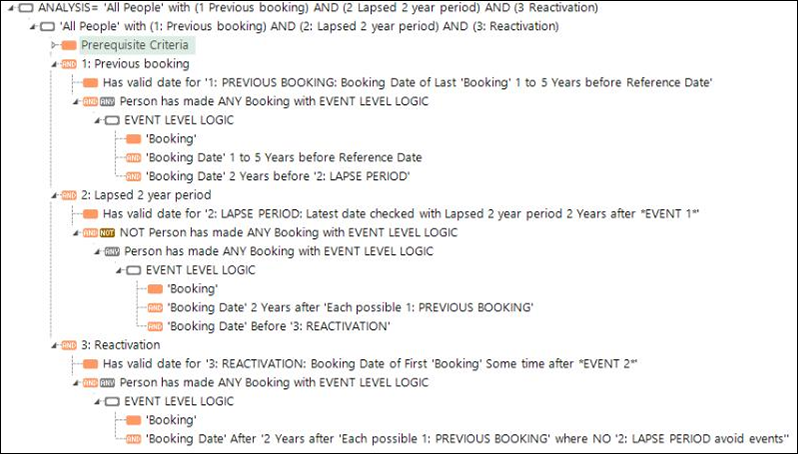
FastStats converts the sequence of events defined in a selection scenario into a pair of selections that define the model profiles.
FastStats now updates the definitions of the analysis and base selections to:
- Use complex expressions where needed to perform the selection
- Include placeholder (dummy) expressions to make the overall logic clear and readable
Data grid options
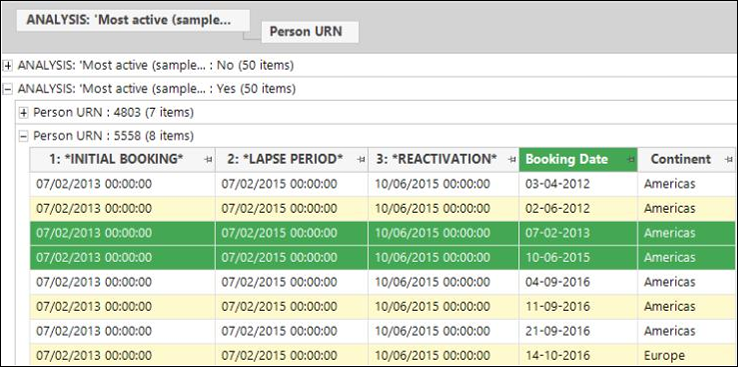
FastStats has extended data grid display options. You can now:
- Choose how many records to display for analysis and non-analysis groups
- Automatically extract and display any variable used in event criteria
- Change the data grid table level to one of the transaction tables
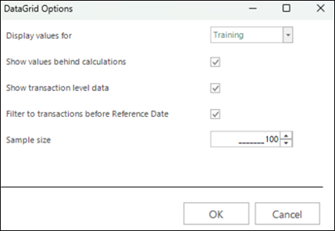
- Apply a transaction filter to limit records which are before the reference date
See Behavioural modelling updates.
General
Multi-factor authentication
FastStats now supports Multi-Factor Authentication (MFA) using One-Time Passcodes (OTP). When you enable OTP, logging in requires your password and a time-limited code from an authenticator app, such as Microsoft Authenticator or Google Authenticator. This protects your account from password theft, reuse, and brute-force attacks, since each code is valid for a single session only.
Any user can self-enrol by scanning a QR code from the Manage OTP option in Change Password. FastStats generates recovery codes at setup, which you should store securely. These let you log in if you lose access to your authenticator app. Administrators can force MFA at user, group, or system level, and can reset OTP for individual users if needed. Service accounts used for automated processes shouldn't have OTP configured.
See Logging in to FastStats and Multi-factor authentication.
System improvements
Scheduled tasks: Virtual variable trigger
In FastStats, the Virtual Variables Updated event trigger for scheduled tasks now supports filtering to a single named virtual variable. Instead of triggering whenever you update any virtual variable, you can now choose which variable activates a given task.
This is useful when multiple virtual variables are in use and you need tasks to respond to changes in one specific variable only.
Note
If you don't choose a variable, the trigger behaves as before. If you choose a variable, the task only fires when you update that variable, regardless of other variable activity. Each scheduled task supports one variable trigger, but you can create multiple tasks, each targeting a different variable.
Query optimisation defaults to level 3
The Apteco engine's query optimisation setting now defaults to level 3. This expands the scope of automatic optimisation to include RFV (Recency, Frequency, Value) calculations. It also covers standard queries and cube calculations, both already part of lower optimisation levels.
This change takes effect automatically with no configuration required. If level 3 optimisation isn't suitable for your environment, you can override this setting manually in the FastStats Configurator. When Override Optimisation Level is set to false (the default), FastStats automatically sets the query optimisation level to 3.
Bug fixes
- Wizards
- Fixed an issue when using the Combine Categories wizard by rule on a datetime variable resulted in an error.
- Expressions
- Fixed issues relating to Pattern Match aggregations
- Date unit periods shouldn't be visible for category grouping
- Category grouping variable should be numeric only
- Grouping still visible for numeric patterns
- Better validation for order values in patterns where the user has edited the text
- Order datetime with units greater than days returned incorrect counts.
- Fixed issues relating to Pattern Match aggregations
For administrators
Administrators can enforce MFA at user, group, or system level, and reset OTP for individual users via user administration. Service accounts used for automated processes shouldn't have OTP configured. See Multi-factor authentication with one-time passcodes for full details.
Q1 2026
25 March, 2026
Analysis
The following enhancements extend pattern match transactional analysis and sequence analysis capabilities.
Numeric patterns: Ongoing sum and mean
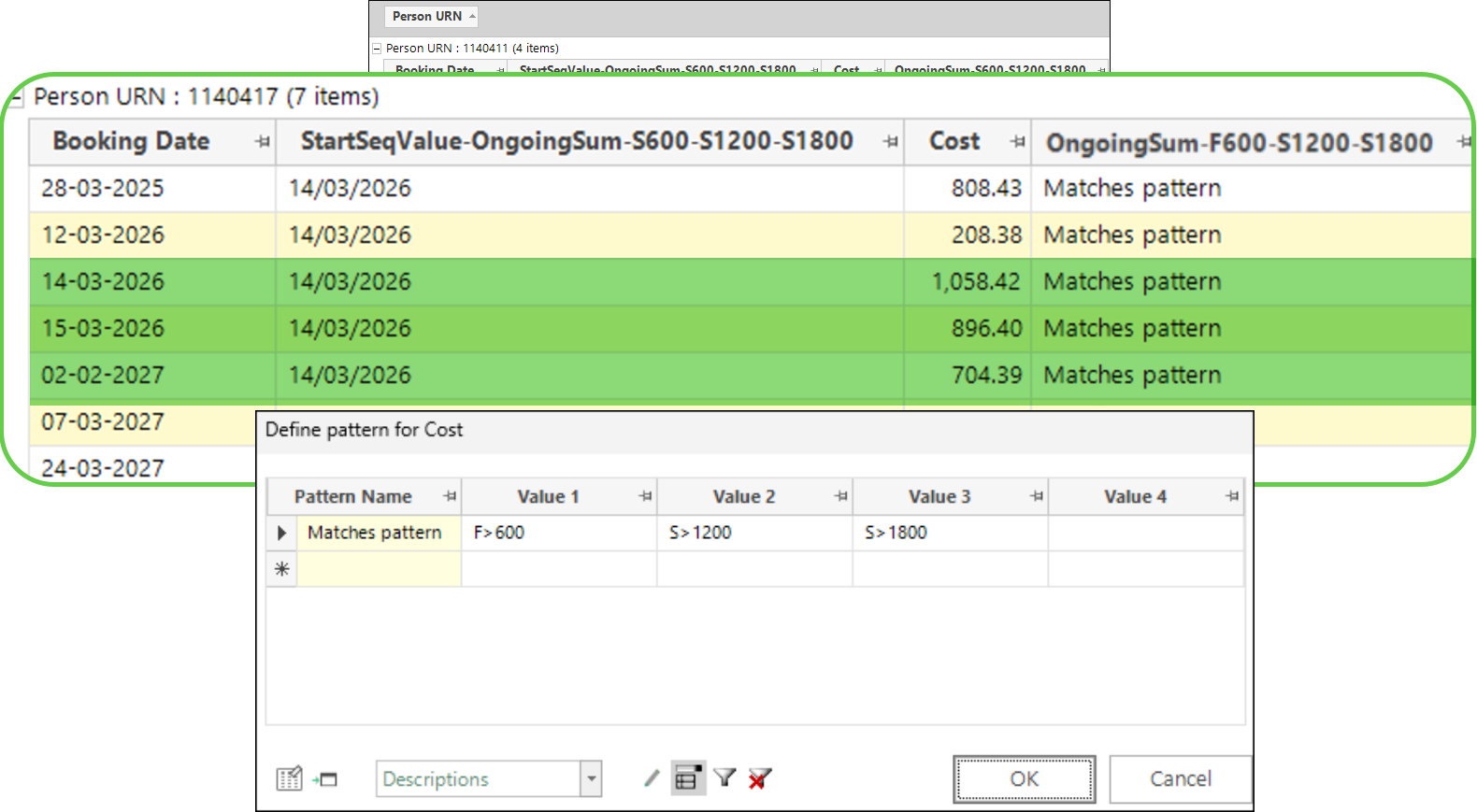
You can already define numeric patterns that contain fixed (F), relative (R), or percentage difference (P) values. You can now also search for ongoing sum (S) and ongoing mean (M) values.
See Expressions: Aggregations on the fly - Pattern Match summary of positional wildcards
Pattern match: Extended time units
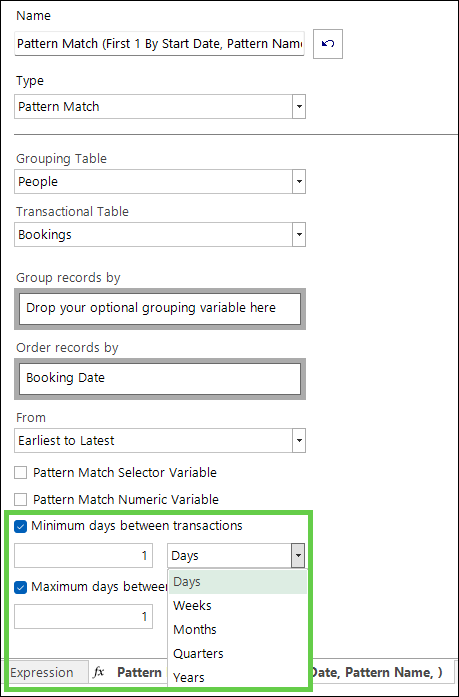
You can now define the minimum or maximum number of days between transactions using other time units: weeks, months, quarters, or years. This lets you enforce an absolute interval between transactions, helping you more accurately analyse scenarios such as monthly repayments or annual donations.
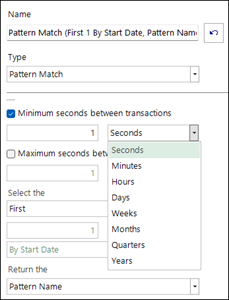
When working with datetime variables, the minimum and maximum options also include seconds, minutes and hours:
See Expressions: Aggregations on the fly - Pattern Match minimum / maximum number of days
Pattern match UI improvements
FastStats now standardises and improves the language used within the user interface for Pattern Match aggregation expressions and the Sequence Analysis wizard.
Category grouping: Linear trend output
You can now select Linear Trend (slope) as an output function when creating a Category Grouping aggregation expression. For example, this helps you monitor customer engagement and the impact of marketing activities over time. A charity might examine the trend of annualised donation amounts. A retailer might review monthly product spend. A rail company might look at weekly travel expenditure.
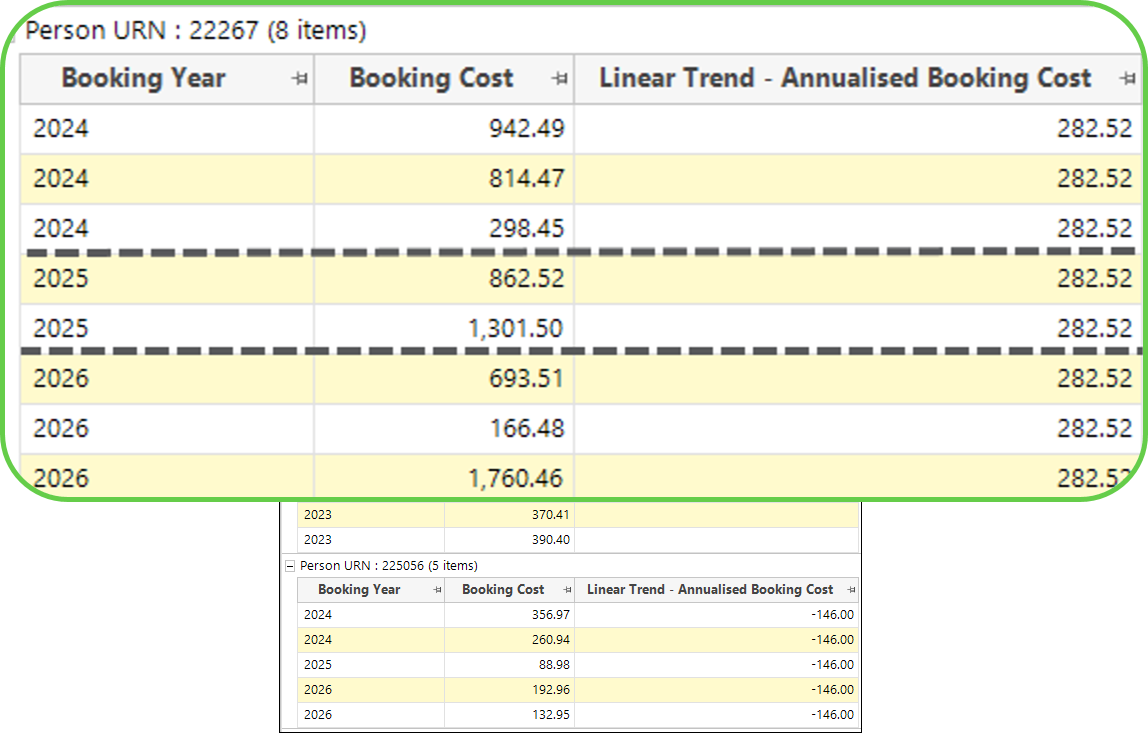
See Expressions: Aggregations on the fly - Category Grouping linear trend output function
Cubes
You can access two new options via the context menu displayed when right-clicking a cube column header.
Show colours at small size
You can now shrink the cells in a cube and display the thematic shading in a heat-map view. Combined with appropriate thematic shading, this option helps you spot correlations in your data. It also provides a quick, straightforward way to run data quality checks, spot cells that differ from what you'd expect, or identify missing data. This is especially useful when one of your two dimensions is an ordered variable, most typically a continuous time or date element. In that case, this view offers a way to examine the seasonality of products. As with all cubes, you can select and drag off cells of interest for further review and analysis.
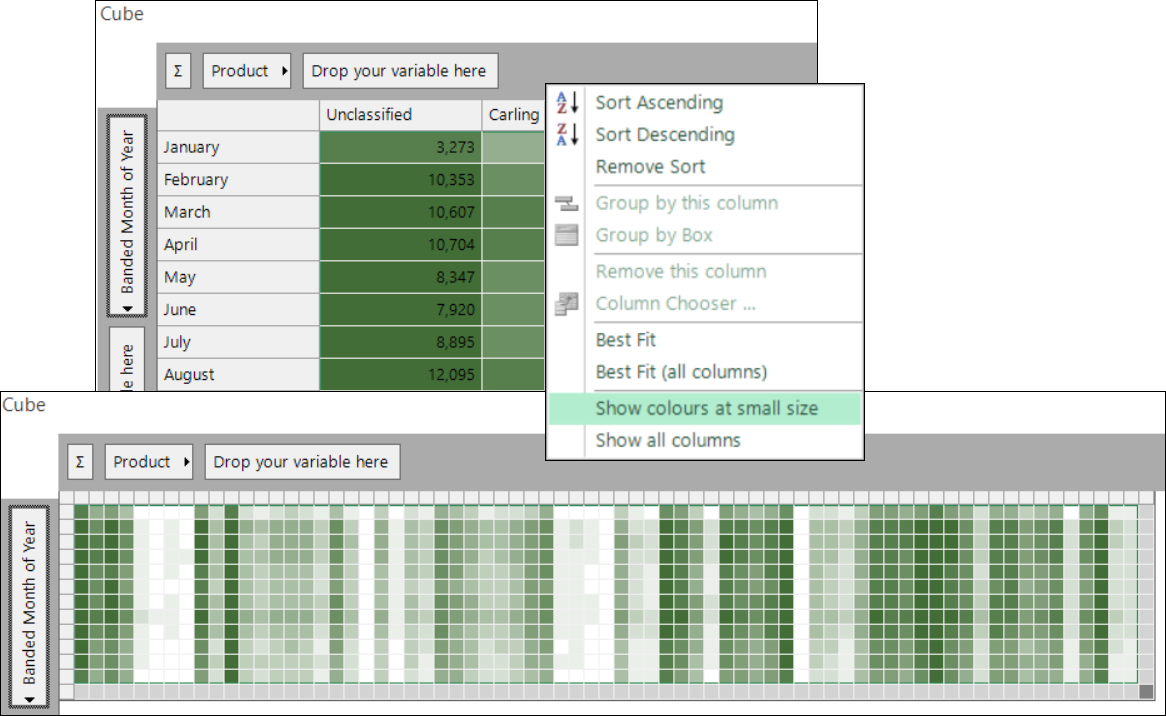
The heat-map view is available for analysis within the FastStats user interface, but you can't export it.
Best fit (all columns)
For ease and convenience, you can now select to apply Best fit (all columns) to the cells displayed in a cube. This saves you from needing to set each column individually.
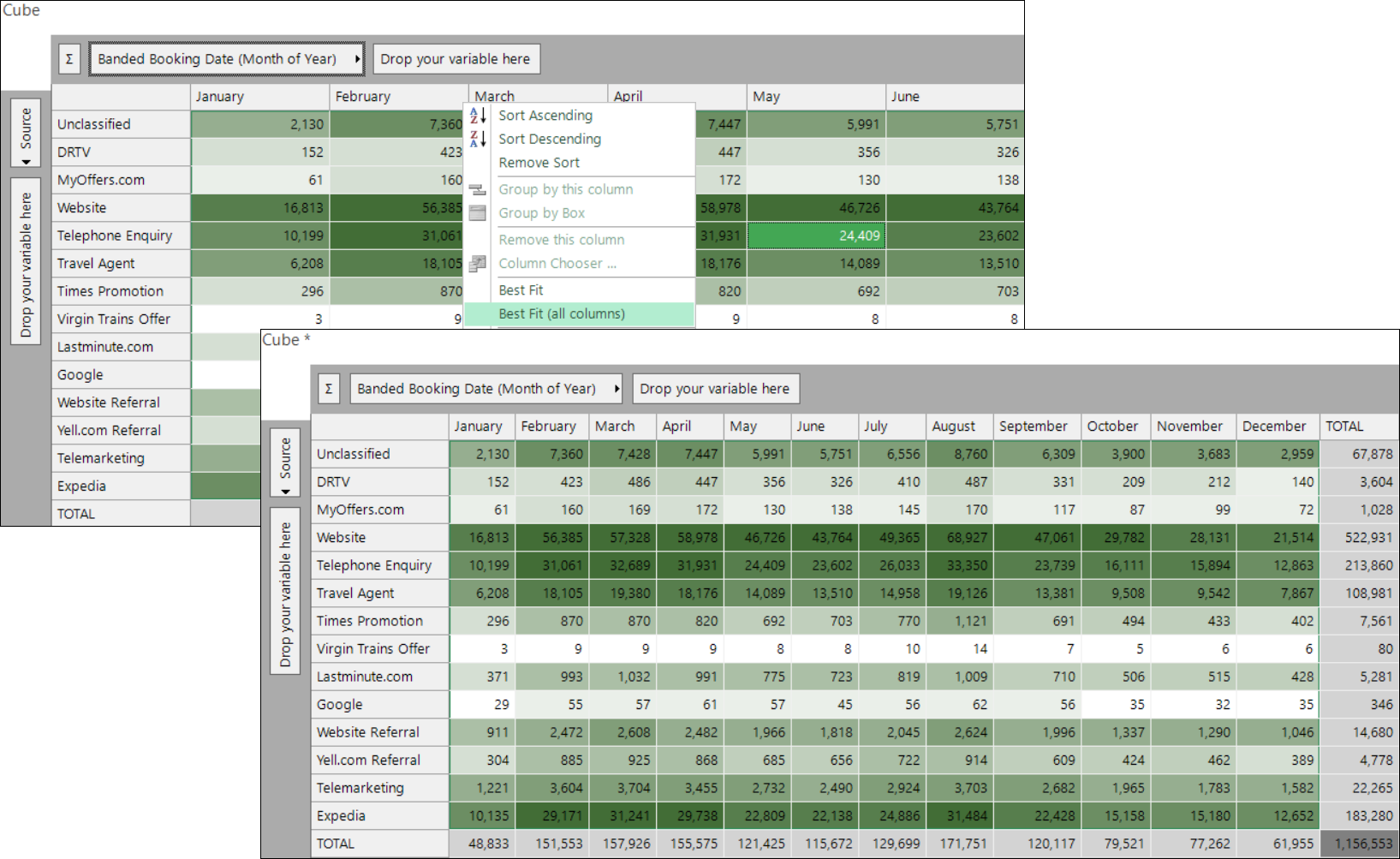
See Cubes
Modelling
This section outlines the latest behavioural modelling developments.
See Behavioural modelling updates
Modelling templates: Unlimited variables
Q3 2025 introduced a first, limited iteration of behavioural modelling templates. This release extends that iteration, letting you template models that include dimensions using any number of variables from multiple transaction tables.
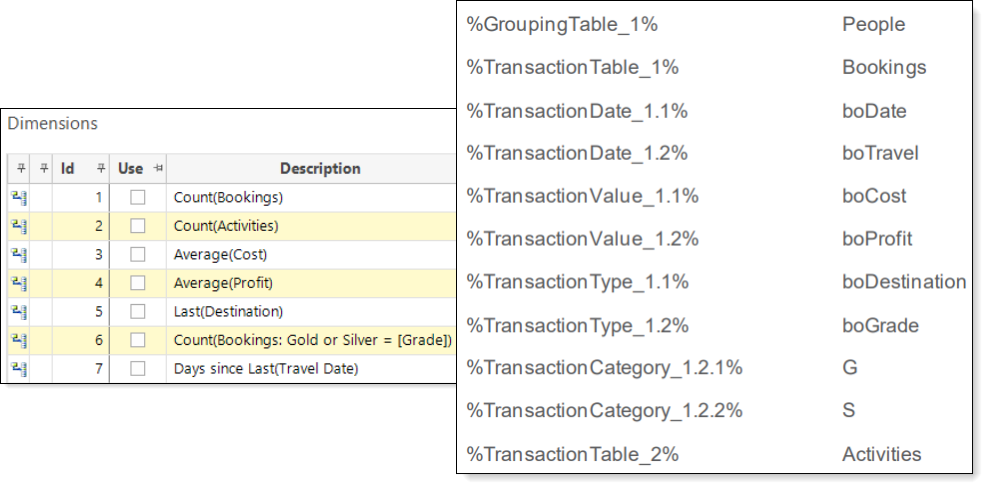
Note
Work is ongoing to make behavioural modelling templates available in Apteco Orbit. Until then, experienced FastStats users can access and use this functionality through the FastStats Modelling Environment. Apteco is still developing both the features and the user interface in this release, and will continue to improve them in future updates.
Transactional preview
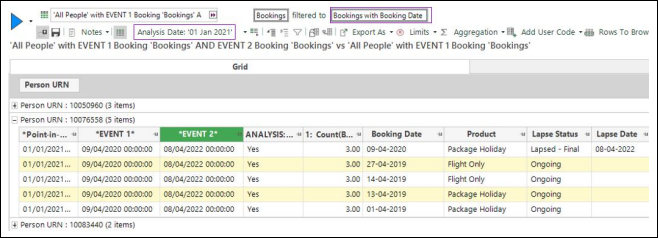
In the Modelling Environment, you can create a data grid and examine records relating to behavioural features in more detail. This now automatically includes transactional data, and lets you choose a sample size. The data grid launches at the transactional level with the analysis date set to the training date used in the model. A transactional filter restricts the transactions shown to only those before this date. You can adjust the filter manually to capture relevant transactions after this date, if required.
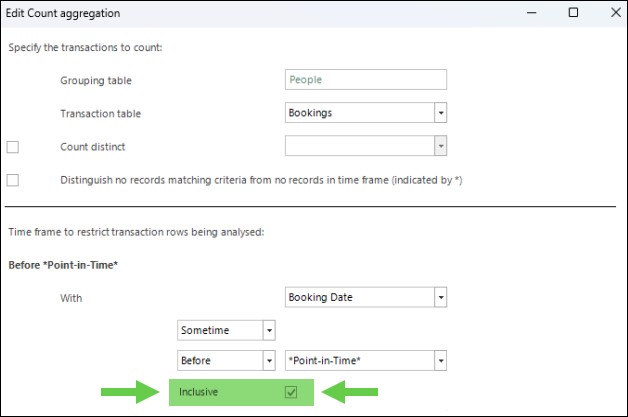
Inclusive point-in-time
When you define a behavioural feature with a time that runs adjacent to the nominated point-in-time, you can now optionally include it. This captures transactions on the day of the event too. It can be particularly impactful, for example, on a charity system where many people lapse after a single donation.
Flexible event-driven model definition
When defining an event-driven modelling scenario, set-up requires you to select a point-in-time. This determines the transactions used when assessing the behaviour of those in the analysis selection, and when looking for differences to explain that behaviour.
There's a risk of misinterpreting behaviour differences as caused by the scenario definition rather than being genuinely predictive. Previously, if the analysis event happened after the reference date, you could only choose the reference date as the point-in-time.
FastStats now offers greater flexibility: you can choose your point-in-time in all cases, but it prompts caution in scenarios where this risk applies.
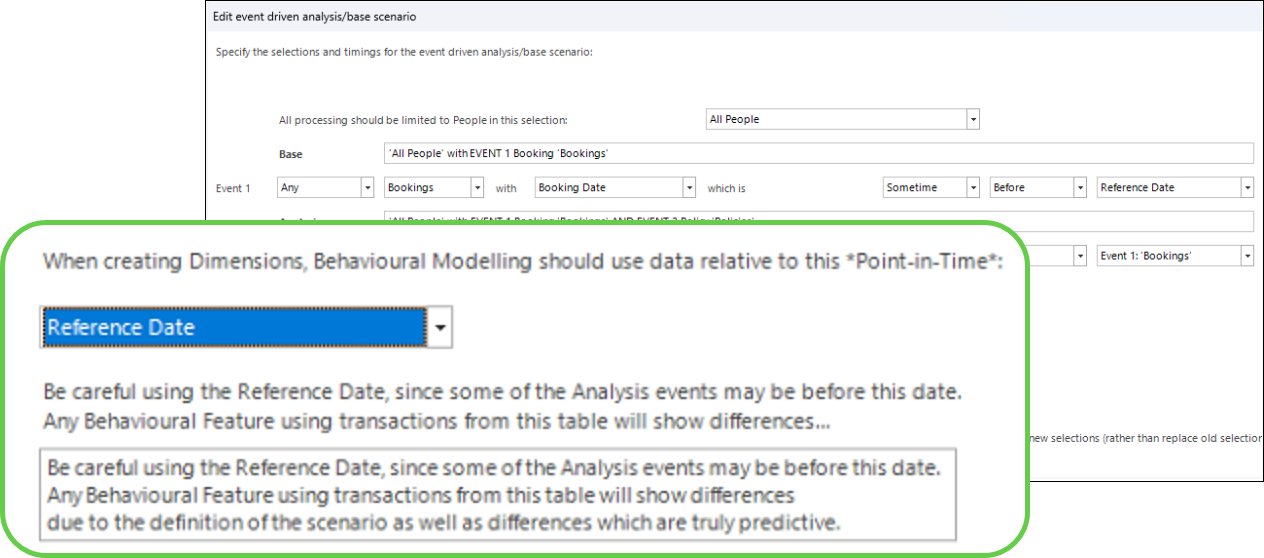
This is of particular significance when creating a churn model.
Flexible fixed-date behavioural models
The range of selections that you can use for fixed-date behavioural models is now consistent with those that are possible when using events.
System improvements
Query engine optimisations enabled by default
The FastStats query engine now runs with all performance optimisations enabled by default, which improves the speed of counting operations across all Apteco systems. The system automatically applies optimisation level 2 without requiring manual configuration.
- When Override Optimisation Level is set to false (default), FastStats automatically sets the query optimisation level to 2, enabling optimisations without manual configuration.
- When set to true, you can manually choose the optimisation level.
OAuth 2.0 for SMTP
The FastStats Service now supports OAuth 2.0 authentication for the Simple Mail Transfer Protocol (SMTP). This ensures continued delivery of administrative emails as Microsoft deprecates Basic Authentication for Exchange Online. You must upgrade to this release and update your SMTP settings in the FastStats Service if you use Exchange Online for email delivery.
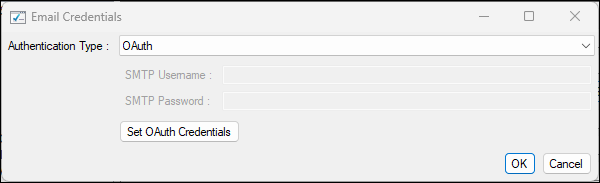
The FastStats Web Service now uses the FastStats Service to send emails. This simplifies configuration by removing the need to maintain duplicate SMTP credentials across multiple services.
Note
Other SMTP providers are also likely to deprecate Basic Authentication in the future, although this change is currently required only for Exchange Online customers.
System Explorer autorefresh on login
You can now configure FastStats to automatically refresh the System Explorer when you log in. This ensures you always see the latest variables and system hierarchy without manually refreshing each time.
UTF-8 filename support in remote paths
You can now use UTF-8 characters such as umlauts, carets, and cedillas in remote file paths. This improves support for international character sets in file locations.
Bug fixes
- Wizards
- Fixed an issue so that selections containing expressions, used with the Create & Update wizard, correctly display the variable description and not the variable reference.
- Expressions
- Fixed an issue where the rank coefficient calculation in the FastStats
fs32svrcomponent incorrectly included missing date values. - Fixed an issue where right-dragging a non-date expression onto a data grid incorrectly opened the start/end year date dialogue.
- Fixed an issue where the Rank on the fly aggregation ordering language displayed an incorrect table name.
- Fixed an issue where the rank coefficient calculation in the FastStats
For administrators
If you use Exchange Online for SMTP email delivery, you must upgrade to this release and update your SMTP settings in the FastStats Service. Microsoft is deprecating Basic Authentication for Exchange Online. See OAuth 2.0 for SMTP for configuration details.