Technical updates
Admin-relevant notices, prerequisites, and security bulletins and advisories for Apteco software.
Bulletin types
- 🔴 Action required: Time-bound. Complete before a specified date or service disruption may occur.
- 🟡 Prerequisite: Install or configure before upgrading to the specified version.
- 🟡 Security bulletin: Apply the linked patch to address a known vulnerability.
- 🟢 Security advisory: Apteco has assessed a known vulnerability. No action required.
- No marker: Informational only. No action required.
Before upgrading
Ensure all Apteco software components are upgraded to the same release version to maintain compatibility. For full upgrade instructions, see Installation and updates.
ASP.NET Core 10 requirement for Apteco Orbit
Effective date: 12 November 2026, with Orbit 2.5.4
Action required
Install the ASP.NET Core 10 Hosting Bundle on the web server before 12 November 2026. Without it, Orbit stops updating automatically from version 2.5.4.
Microsoft ends support for .NET 8 on 10 November 2026, after which it no longer receives security patches. From Orbit 2.5.4, the OrbitAPI requires ASP.NET Core 10 instead.
For installation steps and a list of FAQs, see ASP.NET Core 10 requirement.
Security: Apteco products not affected by PHP2Shell
Published: 22 October 2026
Security advisory: no action required
Apteco products aren't affected by the PHP2Shell vulnerabilities, CVE-2026-109618 and CVE-2026-109619. You don't need to do anything at this time.
- FastStats, PeopleStage, and Orbit: Not affected. They don't use the affected PHP functionality, so they don't need updating.
- Apteco Partner Portal: This partner-facing service uses PHP. Apteco updated it to a patched version of PHP on 21 October 2026 and found no sign that it was exploited or compromised.
Apteco continues to monitor security advisories about PHP2Shell and will update this entry if anything changes.
For the full statement, see Apteco and PHP2Shell vulnerabilities on apteco.com.
Q3 2026
Designer deployment requires a matching Web Service version
Prerequisite
From Q3 2026, Designer can only deploy to a Web Service running the same version. We recommend upgrading all your Apteco software components together.
Designer's deployment process now uses a new method for the Service notification step, replacing an older attachment-based method.
We always encourage keeping your Apteco software in step, so please upgrade everything to Q3 2026 at the same time.
Q2 2026
IP address change for Apteco servers
Effective date: Week commencing 27 April, 2026
Action required
You must add the new IP address to your allowlist before the effective date. This applies if your IT team restricts outbound traffic by IP address rather than by hostname or domain name.
Apteco is updating the network component that manages traffic to Apteco servers. This component is reaching end of life and will no longer receive security or bug-fix updates. This will result in an IP address change for several Apteco services.
- Old IP address: 65.52.65.107
- New IP address: 52.236.9.107
Check whether you're affected
You are only affected if your IT team restricts outbound traffic by IP address rather than by hostname or domain name.
Check with your IT or network team whether 65.52.65.107 is on your allowlist:
- Yes: You must act before the effective date to avoid service disruption
- No: No action needed
Affected services
| Service | URL |
|---|---|
| Apteco Email | https://apteco-email.integrations.apteco.com |
| Apteco SMS | https://apteco-sms.integrations.apteco.com |
| Apteco AI proxy | https://apteco-ai-proxy.integrations.apteco.com |
| Apteco AI Tokens | https://tokens-service.integrations.apteco.com |
| Apteco Licensing | https://licence-service-proxy.licensing.apteco.com |
The following components call these URLs:
- Web Server (FastStats Web Service and OrbitAPI)
- Application Server (FastStats Service)
- Build Server (FastStats Designer)
Required action
Recommended: Add *.apteco.com to your allowlist instead of using a specific IP address.
If you require a specific IP address, follow these steps:
- Before the effective date: Add the new IP address
52.236.9.107to your allowlist alongside the existing entry for65.52.65.107. Don't remove the old IP address yet, as both will be valid during the switchover period. - After confirming the switchover: Remove the old IP address
65.52.65.107from your allowlist once you've verified that services are operating correctly.
Impact if you take no action
- Email and SMS services: Affected servers lose access to those services until you restore connectivity.
- AI services: Affected servers lose access to Orin and all AI functions in Apteco Orbit.
-
Licensing service
Degradation occurs in stages:
- Licence refresh fails and the system logs warnings:
Error refreshing licences for {systemName} with exception {e.Message} - The system continues on its cached licence for up to two months
- Once the cache expires, a two-week grace period applies
- After the grace period, the FastStats Service won't restart:
Could not find a valid licence for: {systemName}
- Licence refresh fails and the system logs warnings:
If you have any questions, please contact the Apteco support team.
Q4 2025
.NET Framework 4.8 requirement
Prerequisite: install before upgrading to Q4 2025
Installing .NET Framework 4.8 requires a server restart. If your FastStats servers also host live SQL databases or websites, plan this work outside of business hours.
The following FastStats components now require .NET Framework 4.8 or later:
- FastStats Designer
- FastStats Configurator
- FastStats Web Service
.NET Framework 4.8 provides enhanced security and enables future support for OAuth-based Simple Mail Transfer Protocol (SMTP) connections. The installer validates that .NET Framework 4.8 is present on your system before proceeding.
For download links and installation guidance, see Requirements and prerequisites.
Q2 2024
ASP.NET Core 8 requirement for Apteco Orbit
Prerequisite
Install the ASP.NET Core 8 Server Hosting Bundle on the web server before upgrading the Orbit API. Apteco strongly recommends you do this as soon as possible so you can continue receiving Orbit updates.
For details on where to download the update and a list of FAQs, see ASP.NET pre-requisite change for Apteco Orbit.
Q3 2023
Security: WebP library vulnerability
Security bulletin: CVE-2023-4863
Apply Q3 2023 patch 16 to update the Chromium component within FastStats to version 116.0.230 or later. Verify your installation includes this version after applying the patch.
A heap buffer overflow in the WebP library within Google Chrome, specifically in versions before 116.0.5845.187, posed a security risk. This vulnerability allowed a remote attacker to execute an out-of-bounds memory write by exploiting a crafted HTML page.
See CVE-2023-4863 and Patch 16: WebP library security flaw in Apteco FastStats.
Q2 2023
SHA-1 hashing algorithm deprecation
Security bulletin
If your FastStats system currently uses the SHA-1 Security Hash Method, transition to SHA-256 or later. Follow the steps in the linked guide.
The SHA-1 hash function for digital signatures is now deprecated. Apteco recommends transitioning all FastStats systems from SHA-1 to at least SHA-256 for improved security aligned with current standards.
See Change hashing algorithm for FastStats systems.
Technical and organisational measures (TOMs) in Apteco Cloud
Apteco Cloud services now integrate Technical and Organisational Measures (TOMs), providing the utmost security and protection for personal information processed within the Apteco Cloud environment. They include:
- Access control
- Intrusion prevention
- Unauthorised activities in data processing systems
- Pseudonymisation and anonymisation
- Control procedures
- Separation control
- Input control
- Availability control
- Resilience and fail-safe control
- Order control
For more details, see Technical and organisational measures (TOMs).
Windows operating system and .NET Framework 4.7.2 requirement
Prerequisite
From the Q2 2023 release, Apteco desktop software requires .NET Framework 4.7.2 or later.
This applies to:
- Client machines: Those running Apteco FastStats or Apteco PeopleStage
- Servers: Those running the FastStats Web Service and FastStats Service components
You can download the latest .NET installers from https://www.microsoft.com/net/download.
Apteco recommends keeping your .NET Framework up to date and applying all Windows updates.
The following operating systems support .NET Framework 4.7.2:
- Windows 7 Service Pack 1
- Windows 8.1
- Windows 10 (all versions)
- Windows Server 2016
- Windows Server, version 1709
- Windows Server, version 1803
- Windows Server, version 1809
- Windows Server 2019
Q1 2022
ASP.NET Core 6 requirement for Apteco Orbit
Prerequisite
Install the ASP.NET Core 6 Server Hosting Bundle on the web server before upgrading the Orbit API.
In January 2022, the second Orbit release (version 1.10.26) added a dependency on the ASP.NET Core 6 Server Hosting bundle for the OrbitAPI. Install this on the web server.
For details on where to download the update and a list of FAQs, see ASP.NET pre-requisite change for Apteco Orbit.
Q2 2021
Digitally signed binary assets
The Q2 2021 release introduced digitally signed binary assets, increasing security by verifying the integrity of code downloaded by the launcher. To take advantage of this feature, update the binaries and create and distribute a new launcher to users.
Troubleshooting
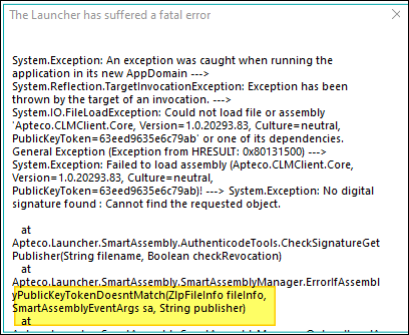
If you configure a new launcher without updating the binaries, opening the launcher shows this exception (or similar):
Password reset functionality
Configuration required
Enter the FastStats Web Service URL in the General tab of your Web Service configuration. Without this, the password reset function won't work after upgrading.
The Q2 2021 release requires you to enter the URL of the FastStats Web Service for the password reset function. You can find this setting in the General tab of your FastStats Web Service configuration.
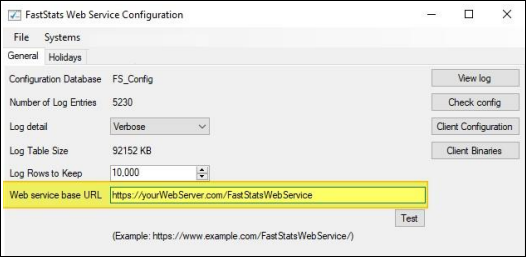
Once you make this change, the FastStats Web Service picks up the configuration after some time. You can also force this by restarting IIS.