Roles and rights
Note
This content is subject to change: upcoming releases will add further User Permissions functionality.
Apteco software provides two mechanisms for managing access:
- Licensing: Lets Apteco manage access based on purchased licences
- Roles & rights: Lets clients or partners manage access for their users
Note
Apteco can't use roles & rights to restrict or manage client/user access, remotely control, or manage any features on behalf of another company.
Through Orbit, Roles & Rights centralise and standardise user and permission (access control) management for Apteco software. At a high-level, Roles & Rights provides two sets of capabilities:
- Users & groups: Lets you create, administer, and delete users and groups through the Orbit UI. Users can belong to more than one group.
- Permissions: Lets you create, administer, and delete access rights to functions within Apteco software for users or groups.
Pre-requisites
Roles and rights need the following pre-requisites:
-
New systems installed after Q1 2021 with an Orbit release after February 2022 can run roles and rights natively. The installation process includes default permissions.
-
Existing systems that plan on only using users and groups functionality don't need to run the migration scripts. Orbit based users and groups operate in conjunction with existing user management in FastStats.
-
Existing systems can either continue to use the current controls, or migrate to the new user permissions. They can't use both. You can migrate existing controls to user permissions, but you can't migrate user permissions to the existing controls. The User Permissions section explains the migration process.
- FastStats currently provides various roles, file access rights, and other restrictions to keep system users and groups organised. It's possible to take one of these systems and migrate it to use user permissions. The migration process assigns permissions to users and groups equivalent to the values that they previously had. You can then alter these permissions as desired once the migration completes.
Feature switches
Users & groups
Note
Users and groups themselves don't need migration. Only the roles and restrictions assigned to them do.
A user with the Orbit administrators role can access users & groups.
Administrators can also disable users and groups for an organisation.
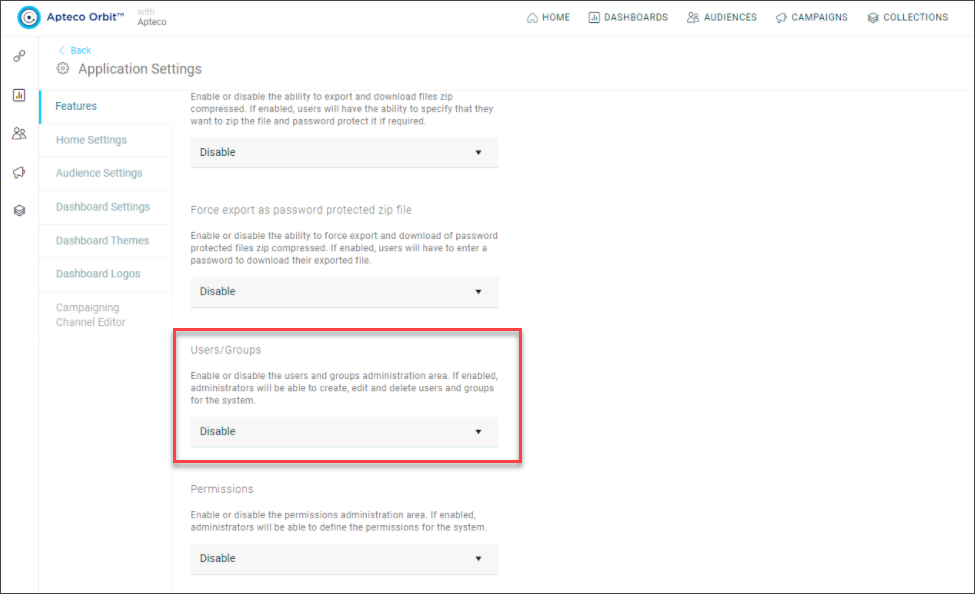
Enabling this lets you manage users and groups from either Orbit or FastStats.