Transferring ownership
The transfer ownership feature in Orbit lets administrators transfer Orbit user resources such as dashboards, audiences, collections, favourites, and workspaces to another user.
This lets administrators transfer ownership of a user's Orbit assets to a different user.
Note
Please use this feature with caution. Once you transfer ownership of a resource, this can't be undone. If misused, this feature can negatively affect a user's Orbit instance.
To transfer ownership:
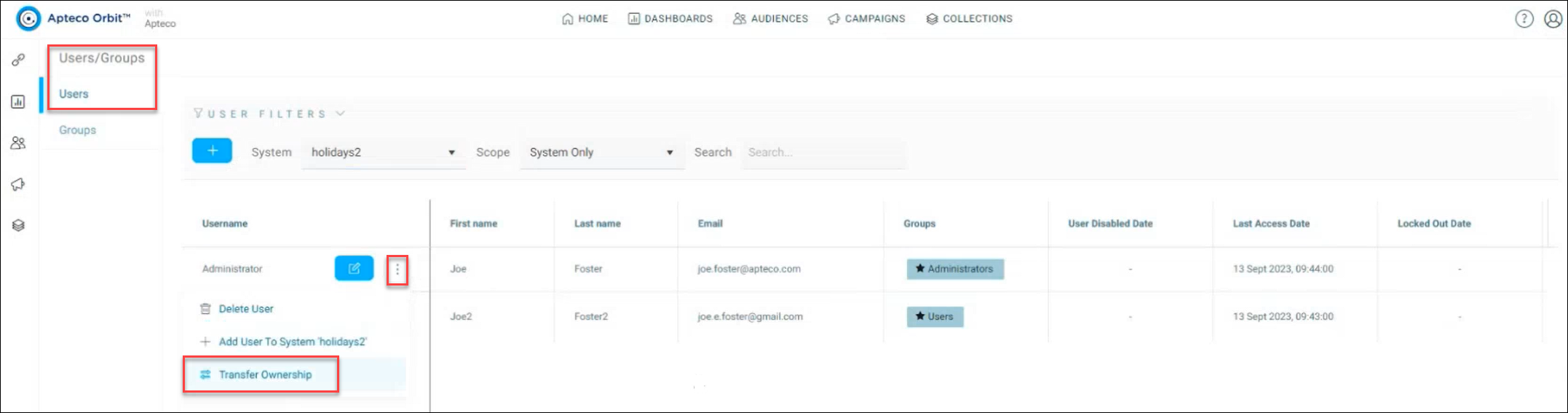
- Navigate to the Users and Groups administration section.
-
Select the Transfer Ownership option. Find the transfer ownership option by selecting the options menu next to a user in the Username section.
A Transfer Ownership breakdown of the total resources for each user is now displayed, divided into dashboards, audiences, collections, workspaces, and favourites.
-
Type the starting letters of the recipient user's name in the Recipient User box and select the relevant user from the dropdown.
- Select Transfer to complete the ownership transfer.
- You'll receive a notification once the transfer is successfully completed.