Configure Apteco to use single sign-on
Once you have set up Single Sign-On (SSO) with your chosen protocol and provider, configure each Apteco product to use it.
Orbit
To configure Orbit SSO:
- Open the Orbit API Configurator.
- Select the General tab.
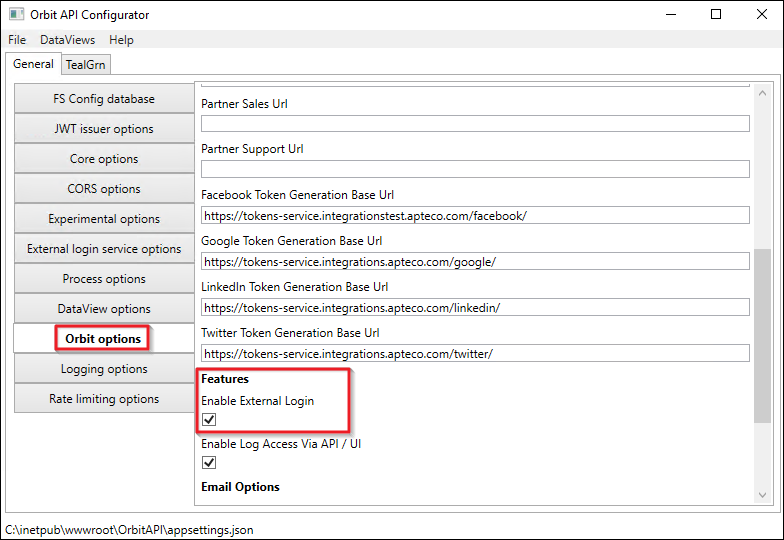
- Select Orbit Options.
-
Under Features, check the Enable External Login box. This configures Orbit to use the SSO login.
-
Save and close the Orbit API Configurator.
FastStats
To configure FastStats SSO:
- Open the FastStats Configurator.
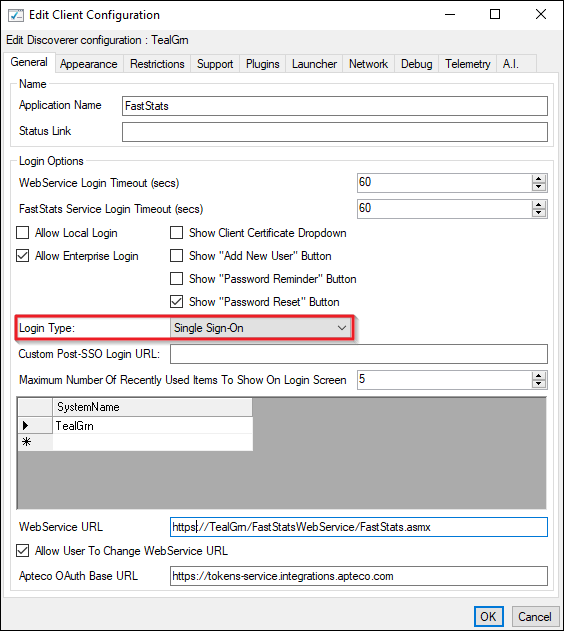
- Go to Web Service > Client Configuration > FastStats Client > Edit.
- Select the General tab.
-
Change the Login Type to Single Sign-On.
-
Select OK.
- Save and close the FastStats Configurator.
Note
Close and re-open the FastStats Launcher to apply this change.
PeopleStage
To configure PeopleStage SSO:
- Open the FastStats Configurator.
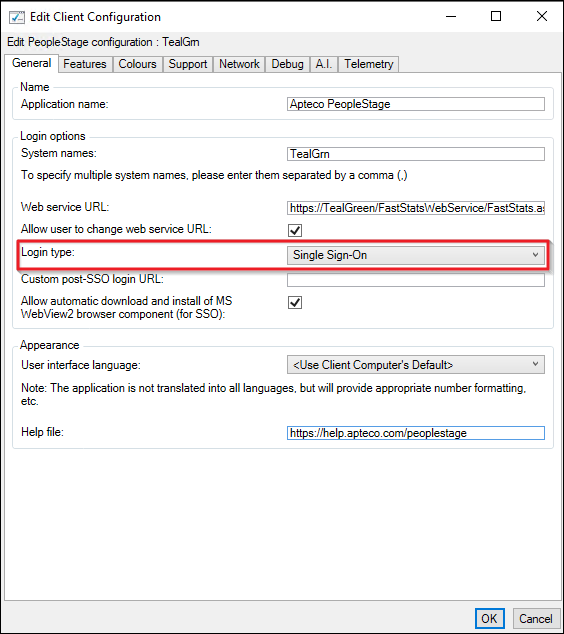
- Go to Web Service > Client Configuration > PeopleStage Client > Edit.
- Select the General tab.
-
Change the Login Type to Single Sign-On.
-
Select OK.
- Save and close the FastStats Configurator.
Note
Close and re-open the PeopleStage Launcher to apply this change.