Expressions
An expression calculates a value for each record from the data you already have. For example, it can work out each supporter's age from their date of birth, the number of years since their first gift, or how far they live from your nearest shop. Use one when the value you need isn't a variable in your system.
Here's an expression that works out each supporter's age in years from their date of birth:
You write an expression in the data picker wherever you need one, using the Apteco expression language. The FastStats expression reference describes each function, though not all of them work in Orbit.
Note
Expressions are an advanced feature, best suited to experienced users.
Where you can use an expression
You can use an expression in many of the places you use a variable. Each place accepts certain types of output, and asks you for something different once you've written the expression:
| Where | Output it accepts | What you choose next |
|---|---|---|
| A filter in an audience's includes or excludes | Numeric, text, or date | The values to include or exclude |
| Dashboard filters: user, dashboard, predefined, tile, and analysis filters | Numeric, text, or date | The values to filter by |
| A behaviour's transaction filter | Numeric, text, or date | The values to filter by |
| A measure on a dashboard tile, or a workbook cube or chart | Numeric | A function to summarise it, such as Mean |
| A data grid column | Numeric or text | The column's title |
| A content field in message personalisation | Numeric, text, or date | Nothing more: the value becomes a column in your campaign's output file |
Note
In message personalisation, you can also use an expression saved in FastStats, instead of writing a new one.
Build an expression explains how to write one and use it in each of these places.
How expressions work
Every expression belongs to a table, which you choose when you write it. Orbit calculates one value for each record of that table. Expressions in Orbit follow these rules:
- Variables: You refer to a variable by its exact name in square brackets, such as
[DOB]. An expression can only use variables that exist in your FastStats system, from its own table or from any table above it. - Output type: The value an expression returns, such as numeric or text, must suit where you use it. See Where you can use an expression.
- Functions: Orbit supports the functions of your FastStats version, including aggregation functions such as
Max. If you use a function that's newer than your FastStats system, Orbit tells you.
Note
You can't use queries, cube lookups, derived cube expressions, or on-the-fly aggregations in an expression in Orbit. You can still use an expression as a measure on a cube.
Example
To find supporters who live within 20 miles of one of your three regional offices, write a numeric expression on the People table that calculates the distance in miles from each supporter's postcode to the nearest office:
Then filter on values up to 20. The example expressions show more patterns.
Validation
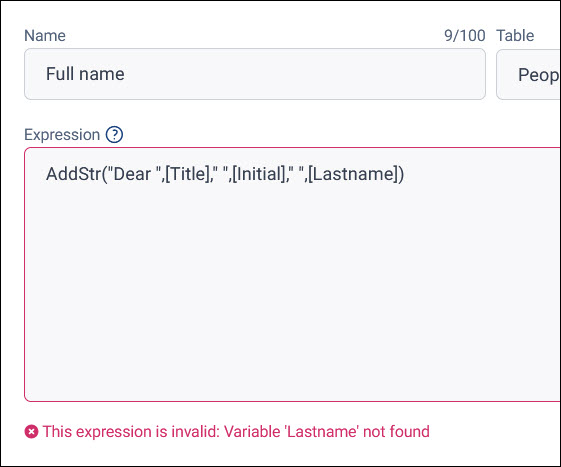
Orbit checks your expression as you type, and won't apply one that isn't valid. As well as the rules above, it checks your syntax: for example, that functions are spelt correctly, and brackets are complete and matching.
When there's a problem, Orbit says what's wrong under the expression:
Who can use expressions
What you can do with expressions depends on your licence:
- Expressions aren't available with a Selector licence.
- Expressions in message personalisation need the Analyser bundle or higher.
Next steps
Once you know where you want to use an expression:
- Build an expression
- Start from one of the example expressions
- Look up functions in the FastStats expression reference