Audiences and files
Instead of rebuilding the same criteria each time, you can reuse a group of records you've already defined: a saved Orbit audience, or a file saved in your FastStats system. You find them on the Audiences and Files tabs of the data picker.
Audiences
The Audiences tab lists your audiences and the audiences shared with you, each with its record count and table.
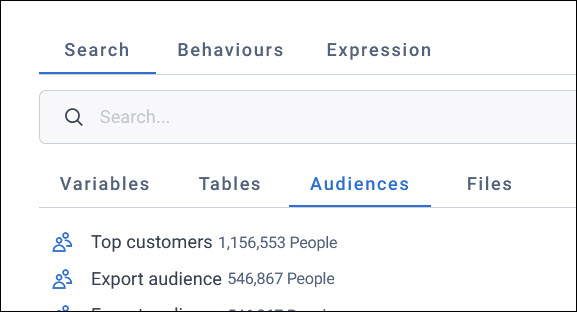
An audience you use in a filter stays linked to the original. When someone changes the original, every audience and dashboard that uses it picks up the change. This means you can:
- Keep one master copy of criteria you use often, such as active supporters or a do-not-contact list
- Use several audiences in one audience, and use an audience that itself uses another
- Use an audience that's been shared with you as part of your own
Example
A charity keeps a "Do-not-contact" audience of supporters who've opted out or asked not to be contacted. Every appeal audience excludes it. When the supporter care team adds someone to it, every appeal leaves them out from then on.
You can choose an audience in an audience's includes and excludes, in dashboard filters, and as a measure, which counts its records. You can't use an audience as the dimension of a dashboard tile, but you can in an audience workbook cube.
Note
A combine audiences custom variable copies an audience's criteria when you add it, rather than linking to it. It doesn't pick up later changes to the audience.
Files
The Files tab shows the folders of files saved in your FastStats system:
- URN files: Lists of the unique references of specific records, such as supporters who've made a complaint, a seed list, or people who signed up at an event
- FastStats selections: Selections saved in FastStats, including complex ones built with N per limits or recency, frequency, and value aggregations, so you can reuse your FastStats segments without building them again
- Files of values: Lists of values you've uploaded in Orbit when filtering by a variable, such as a list of postcodes
Note
A URN file holds records from one table, such as people or households. Using one in an audience doesn't always change the audience's count, because the audience may not include any of the file's records.
To add a file of references in Orbit, upload it when you filter by a reference variable. On a dashboard, you can choose whether Orbit keeps it permanently or only for now. See URN files in dashboard filters.
Example
A charity's supporter care team keeps a URN file of supporters who've made a complaint. The fundraising team adds it to the excludes of each appeal audience, so those supporters aren't contacted while their complaint is open.
Include or exclude records
When you choose an audience or a file for a filter, in an audience or on a dashboard, Orbit asks whether to include or exclude its records.
To filter by an audience or a file:
-
In the data picker, select the audience on the Audiences tab, or the file on the Files tab.
-
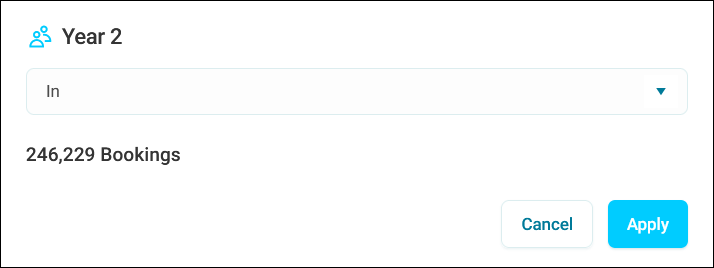
Choose an option from the dropdown:
- In: Includes the records in the audience or file
- Not in: Excludes the records in the audience or file
-
Select Apply.
The audience or file then filters your data like any other criteria.
Caution
In an audience's Excludes, choose In to leave out the audience's or file's records. Choosing Not in under Excludes leaves out everyone who isn't in it.