Tables
Your data is held in tables, one for each kind of thing your system records, such as households, people, and donations. Every variable belongs to one of them. Your system's tables are set up when it's built, in FastStats Designer or Orbit Connect.
Tip
In Orbit Connect, you can also choose how your variables are organised into folders, so they're easy to find in the data picker. See Folder structure.
How tables are arranged
Tables sit in a hierarchy. Each record in a table belongs to one record in the table above it. For example, each donation belongs to one person, and each person belongs to one household. The data picker's Tables tab shows the hierarchy as a tree.
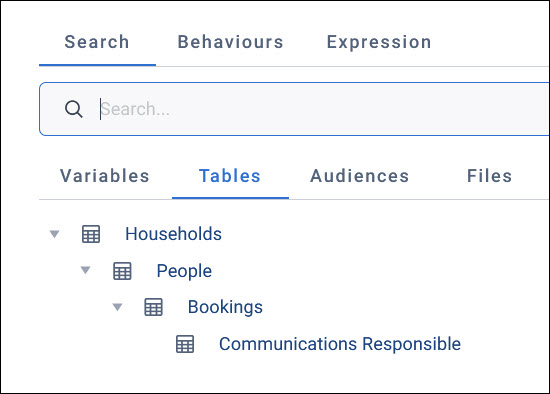
The hierarchy affects what you can do with your data:
- What you count: The same filter gives different counts on different tables. Counting people and counting their donations give two different numbers.
- Behaviours: A behaviour needs a table of transactions below the table you're working with, such as donations below people
- Expressions: An expression can use variables from its own table, or from any table above it
Choose a table to count its records
Choose a table on the Tables tab of the data picker when you want to count its records, or to group records by it. For example:
- A measure on a dashboard tile or workbook chart, such as the number of people
- The measure that a campaign goal tracks, such as the number of bookings
- Per on an N per limit, to limit the number of records for each record of another table
Example
A charity's dashboard is filtered to supporters in the North West. A number tile measuring the People table shows how many supporters that is. A second number tile, measuring the Donations table, shows how many donations those supporters have made.
Other places you choose a table
Some features also ask which table to work at:
- An audience's table level decides what the audience counts, such as people or transactions
- A dashboard tile counts through a table that its filters resolve to
- An expression's Table, on the picker's Expression tab, is the table it calculates a value for each record of