Homepage
The Orbit homepage gives you an overview of your resources, quick access to the items you're working on, and links to new features and learning resources.
The layout adjusts to the size of your browser window, so everything stays readable on smaller screens.
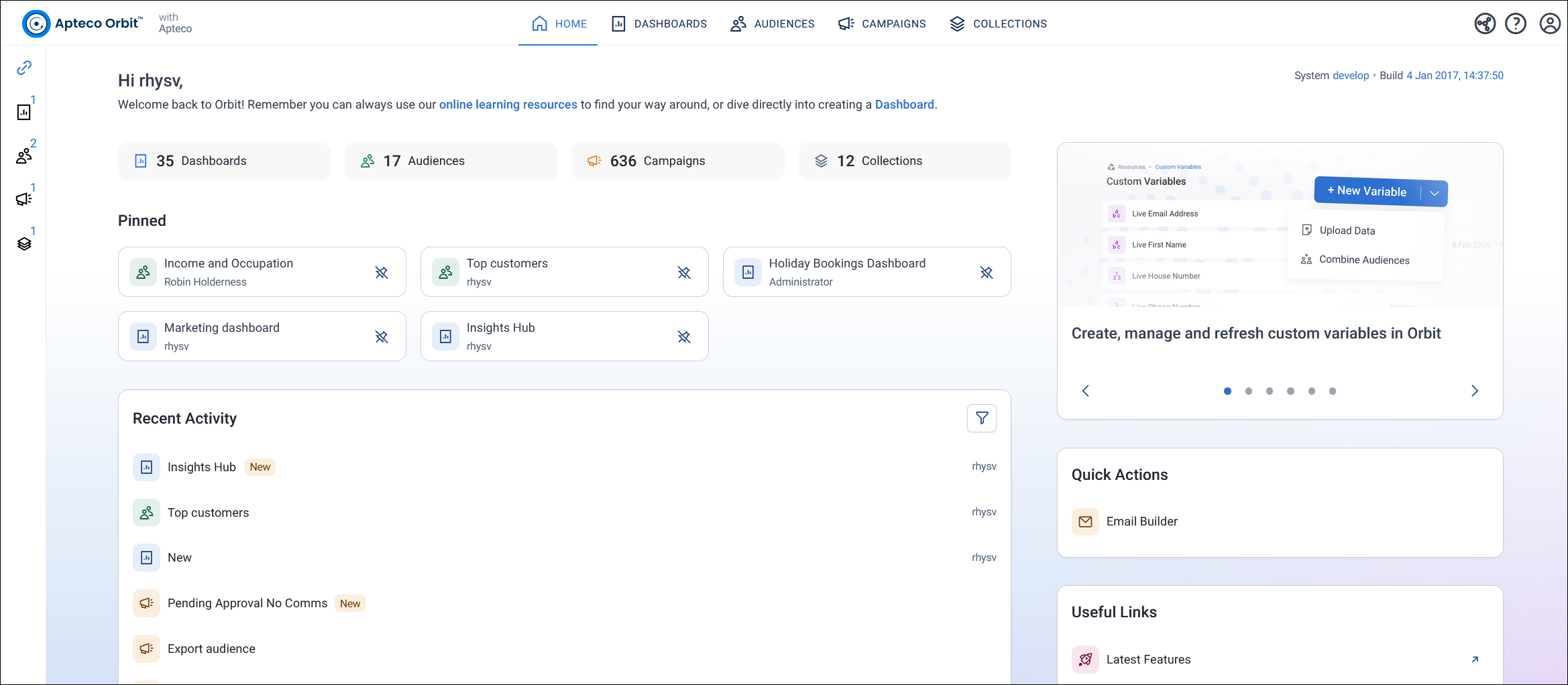
Navigation
Use the tabs at the top of the screen to move between Home, Dashboards, Audiences, Campaigns, and Collections.
Other areas are available from the icons around the edge of the screen:
- Workspaces: Select the link icon at the top left to open your workspaces.
- Orbit Connect: Select the Orbit Connect icon at the top right, next to the help icon.
- Orin: Select the Orin icon at the bottom left.
- Account and settings: Select your avatar at the top right to manage your account and settings.
Note
Your administrator may have turned off one or more of Dashboards, Audiences, Campaigns, or Collections. Turned-off features don't appear in the navigation.
Resource counts
Below the welcome message, cards show how many dashboards, audiences, campaigns, and collections you have.
If your administrator has turned it on, the top right of the welcome area shows your system name and build date. See Home settings.
Pinned
The Pinned section lists the items you've pinned, so you can get back to them quickly. To unpin an item, select the unpin icon next to it.
You can pin dashboards and audiences. To find out how, see Manage your dashboards and Manage your audiences.
Note
If you haven't pinned anything, the Pinned section doesn't appear.
Recent activity
Recent Activity lists up to 20 of your resources, with the most recently modified first. It includes resources you own and resources other people have shared with you.
Each item shows:
- An icon for the resource type
- A New label if the resource was created in the last 24 hours
- A sharing label, such as Shared With Me
- The owner of the resource, on the right. Campaigns don't have an owner, so this is blank for campaigns.
To filter the list, select the filter icon, then choose your options:
- By Status: All, Owned, Shared By Me, Shared With Me, or Not Shared
- By Type: All, or any combination of Dashboards, Audiences, Campaigns, and Collections
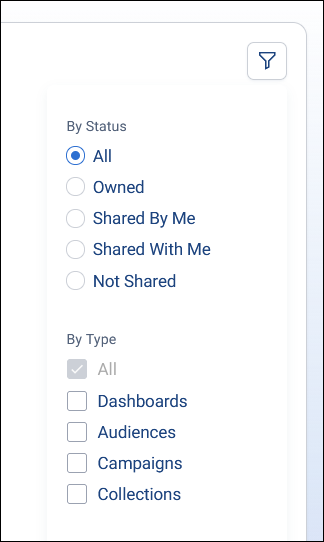
Orbit applies the filter as soon as you choose an option. Select Save to keep it for the rest of your session, or Reset to go back to your last saved filter.
Latest features
The carousel at the top right highlights a selection of new features from recent Orbit releases. Use the arrows or the dots below each feature to move between them. For full details of every release, see the Orbit release notes.
Quick actions
If you're an administrator, the Quick Actions panel gives you shortcuts to administrator tools, such as the Email Builder and SMS Builder.
Useful links
The Useful Links panel links to:
- Latest Features: The Orbit release notes
- On-demand Training: Apteco Academy, Apteco's online learning environment
- Help Hub: The Apteco Help Hub
Footer
The footer at the bottom of the screen shows when you last logged in, your client version, and your DataView. It also has links to the privacy policy and terms of use, and lets you change your language. See Language options.