Numeric and currency variables
Numeric variables hold numbers, such as age or holiday length, and the data picker shows them with the 123 icon. Currency variables hold amounts of money, such as a donation amount, and show a currency symbol, such as £. You filter by both in the same way, by setting one or more ranges of values.
Filter by a numeric or currency variable
Each range has a start and an end, and you can include or exclude several ranges in one filter.
To filter by a numeric or currency variable:
-
Choose an option from the dropdown:
- Is any of: Includes records in any of the ranges you set
- Is none of: Excludes records in any of the ranges you set
-
Set the start of the range, under From:
- = Equal to: Matches one exact value
- > Greater than: Matches values above the number you enter
- >= Greater than or equal to: Matches values from the number you enter upwards
- -∞ No lower bound: Includes every value up to the end of the range
- Ø Missing values: Includes records with no value
-
Set the end of the range, under To:
- < Less than: Matches values below the number you enter
- <= Less than or equal to: Matches values up to and including the number you enter
- ∞ No upper bound: Includes every value from the start of the range
-
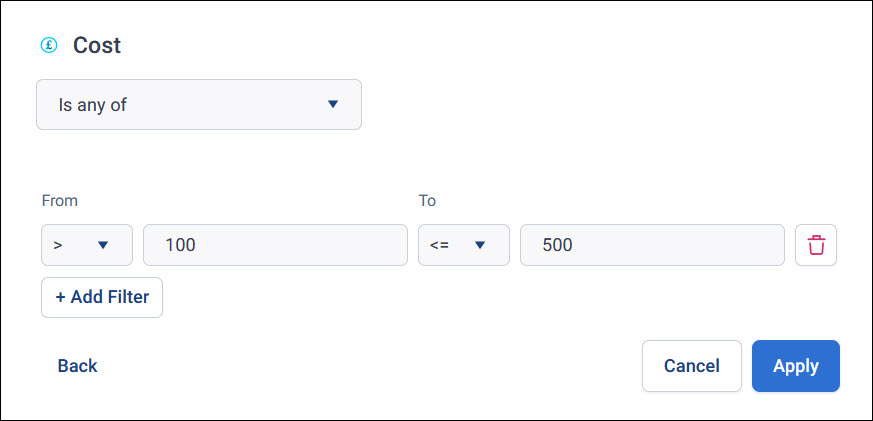
To add another range, select + Add Filter. To remove a range, select its bin icon.
-
Select Apply.
Example
To find mid-level donors, filter by Donation Amount, choose Is any of, and set From to > Greater than 100 and To to <= Less than or equal to 500.
Use numeric variables elsewhere
Numeric and currency variables are also the ones you can summarise on a dashboard tile, such as the total or average donation. As a tile's dimension, a numeric variable splits the data into bands of values.